Live Streaming · Solo Host
One person is presenter, audio tech and vision operator.
A solo-host system should reduce decisions while you are live. Keep one primary camera, one close voice path, one known light position and a small set of controls. Add hardware only when it removes a repeated task or protects the show from a failure you have actually experienced.
Visual setup · repeatable operator core
Build a one-person room the host can understand at a glance
The visual core is intentionally simple: one close voice, one repeatable microphone position and one known light. Camera and control layers are added only when their job is clear.
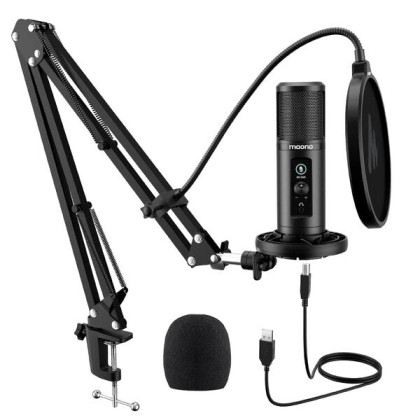 Voice [DEC SALES] MAONO AU PM422 Podcast Microphone AU-PM422
A direct computer voice path the host can monitor and understand.
Voice [DEC SALES] MAONO AU PM422 Podcast Microphone AU-PM422
A direct computer voice path the host can monitor and understand.
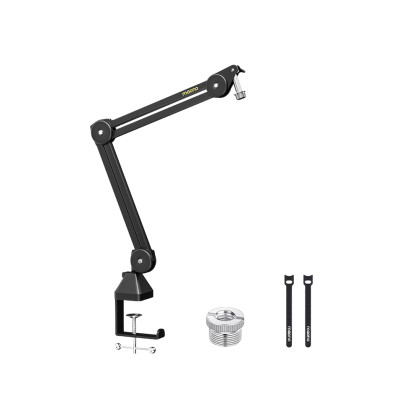 Position [AUGUST SALES] Maono BA37 Microphone Suspension Boom Arm Stand
Make the useful microphone position repeatable from show to show.
Position [AUGUST SALES] Maono BA37 Microphone Suspension Boom Arm Stand
Make the useful microphone position repeatable from show to show.
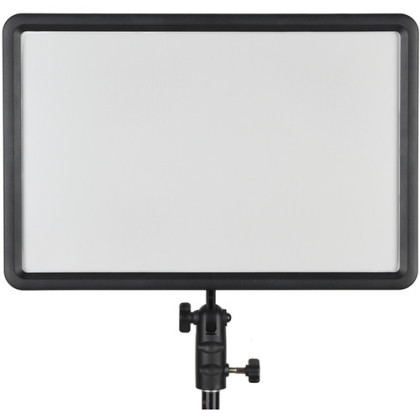 Light Godox LEDP260C Bi-Color LED Light Panel
Keep exposure predictable without rebuilding the room every time.
Light Godox LEDP260C Bi-Color LED Light Panel
Keep exposure predictable without rebuilding the room every time.
Price, stock, warranty, condition and pre-owned availability are live from the Altech catalogue.
Choose the operating model first
Most solo shows fit one of three routes.
The correct setup depends less on how “professional” the room looks and more on how many things the host has to operate while still talking to the audience.
Solo host · core operator setup
The one-person core: voice, placement and repeatable light
These three roles reduce the amount of setup the host has to think about while live. Keep any role you already own; the objective is repeatability, not replacing working gear.
New
USB host mic
Maono
[DEC SALES] MAONO AU PM422 Podcast Microphone AU-PM422
Why we'd pick it
A simple direct-to-computer voice path for a host who is also operating the show.
Watch out for
Close placement still matters; a USB mic does not cancel a noisy room by itself.
In stock
MYR359.00
View product →
New
Mic positioning
Maono
[AUGUST SALES] Maono BA37 Microphone Suspension Boom Arm Stand
Why we'd pick it
Keeps the host mic near the mouth without taking over the operating surface.
Watch out for
Check the clamp and swing path against the real desk.
In stock
MYR139.00
View product →
New
Host light
Godox
Godox LEDP260C Bi-Color LED Light Panel
Why we'd pick it
A fixed bi-colour panel that can stay ready for repeatable host exposure without a large studio-light footprint.
Watch out for
Needs a stand/mount position; the product alone does not decide good light direction.
Warranty 3 Months Shop Warranty
In stock
MYR339.00
View product →
Price, stock, warranty, condition and pre-owned availability are live from the Altech catalogue.
Reviewed by
Altech Camera team · Kuala Lumpur
Last reviewed 18 September 2026
How we maintain this guide
This guide treats solo hosting as an operating problem as well as a picture problem. The merchandising is split into the equipment that keeps the host in control and the separate camera/capture path, so shoppers can keep what they already own instead of buying a fake all-in-one kit.
Shop in Kuala Lumpur
Build a one-person streaming setup in Kuala Lumpur
Altech Camera in Kuala Lumpur carries USB audio, boom arms, lighting, Elgato capture/control gear and creator cameras for solo hosts. Keep the operator side simple, then add the camera/capture path only where it improves the actual show.
Altech Camera · Kuala Lumpur
Altech Camera Lot 0639, Level 6 (West), Berjaya Times Square, No. 1, Jalan Imbi 55100 Kuala Lumpur, Malaysia Call +60129315510
Optional operator control
Add physical control only for actions the host actually performs live
A Stream Deck is useful when repeated scene, mute, media or record actions keep pulling the host away from the audience. It is not part of the minimum core.
 New
New
Only if live control is repetitive
Elgato
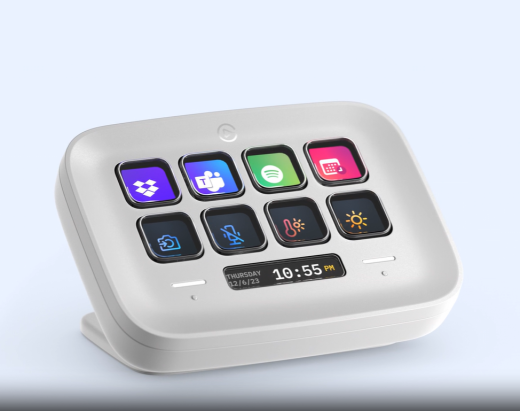
ELGATO Stream Deck Neo (8x Customizable LCD Keys + 2x Touch Points)
Why we'd pick it
A compact physical control route for the small number of actions the host must trigger while still presenting.
Watch out for
Map only essential actions; more buttons do not make the show easier.
Warranty 2 Years Warranty
In stock
MYR589.00
View product →
Price, stock, warranty, condition and pre-owned availability are live from the Altech catalogue.
Keep what works
A better one-person show does not require a new camera if the current picture is already reliable.
Fix the repeated operator friction first: microphone position, lighting or essential live controls. Move to the camera path only when picture/framing is the real limitation.
Camera route
One flexible angle is enough until a second angle has a real job.
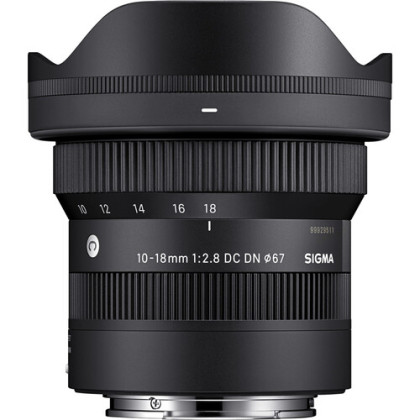
The wide zoom is deliberately more flexible here than the fixed 11mm facecam lens: a general solo host may move between face-only, wider desk and product/whiteboard framing without wanting to rebuild the camera position.
Solo host · picture path
The camera side: one flexible host angle into the computer
For a host who wants a dedicated interchangeable-lens camera, this gives one body, a flexible wide zoom for desk/room framing, and a computer capture path. Skip any part you already own.
![[USED] Sony ZV-E10 II Mirrorless Camera (98% Like New)](https://s3-ap-southeast-1.amazonaws.com/altech-prod/uploads/public/693/79a/94e/thumb_100382_520_420_auto.jpeg) Pre-Owned
Pre-Owned
Host / creator body
Sony
[USED] Sony ZV-E10 II Mirrorless Camera (98% Like New)
Why we'd pick it
A compact camera that can handle a fixed host position and still serve normal creator recording away from the desk.
Watch out for
Needs a lens, long-session power and capture; it is not a one-box streaming solution.
Condition Pre-loved
Warranty 1 Month Shop Warranty
In stock
MYR3,499.00
See this actual unit →
 New
New
Flexible desk lens
Sigma
Sigma 10-18mm F2.8 DC DN Contemporary Lens (Sony E) (3 Years Sigma Malaysia warranty)
Why we'd pick it
A wide f/2.8 zoom that gives a solo host room to change between tighter face framing and wider desk/room framing without moving the camera.
Watch out for
Specialised toward wide APS-C framing and unnecessary when the camera can sit farther back.
Warranty 2+0.5 Years Sigma Malaysia Warranty
In stock
MYR2,999.00
View product →
 New
New
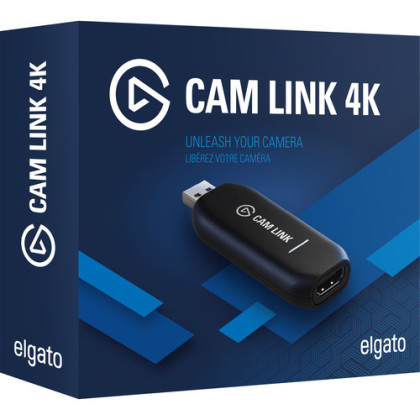
Computer capture
Elgato
Elgato Cam Link 4K (HDMI Input For Mac / Windows , Video Capture Card)
Why we'd pick it
A straightforward bridge from a compatible HDMI camera into a software-led one-person show.
Watch out for
The computer remains the production engine; verify camera output and long-session power.
Warranty 3 Months Shop Warranty
In stock
MYR579.00
View product →
Price, stock, warranty, condition and pre-owned availability are live from the Altech catalogue.
The one-person rehearsal
Test the things you cannot fix while talking.
Do not rehearse only the opening frame. Rehearse the actions and failures that force the host to stop being the host.
Can the room be ready in a repeatable sequence?
Camera, mic and light should return to known positions without rebuilding from memory.
If setup is the pain, fix mounting/cabling before buying more electronics.Can you mute, change scene and recover without hunting?
Put only the actions that happen live onto physical control. Rehearse them while speaking, not silently.
The control surface earns its place by reducing attention cost.How do you know the audience still has picture and voice?
Check the actual programme/output path, not only the local camera preview or microphone LED.
Confidence is part of a one-person workflow.What happens if the camera or one scene disappears?
Have a simpler fallback scene or known restart path before buying full redundancy.
Protect the show against the failure you can name.Browse by role
Keep what already works. Replace only the weak layer.
The exact product shelves above are the starting recommendation; these categories are for alternatives in the same role.
Need a narrower answer?
Use Gaming, Facecam or Just Chatting when that is the actual format.
Solo Host is the general one-person operating page. The sibling guides go deeper when game load, camera geometry or host conversation is the dominant constraint.